
Reef runs Mac apps on Linux. What people see is the frameworks: AppKit drawing the windows, SwiftUI laying things out, menus showing up in the bar. The part I keep thinking about sits under all of that, though. It’s the loader, the piece that takes a Mac program file off the disk and turns it into a running process. If that part doesn’t work, nothing above it gets a chance to.
This is Ghostty, the same Mac version a Mac user downloads, running on Linux:
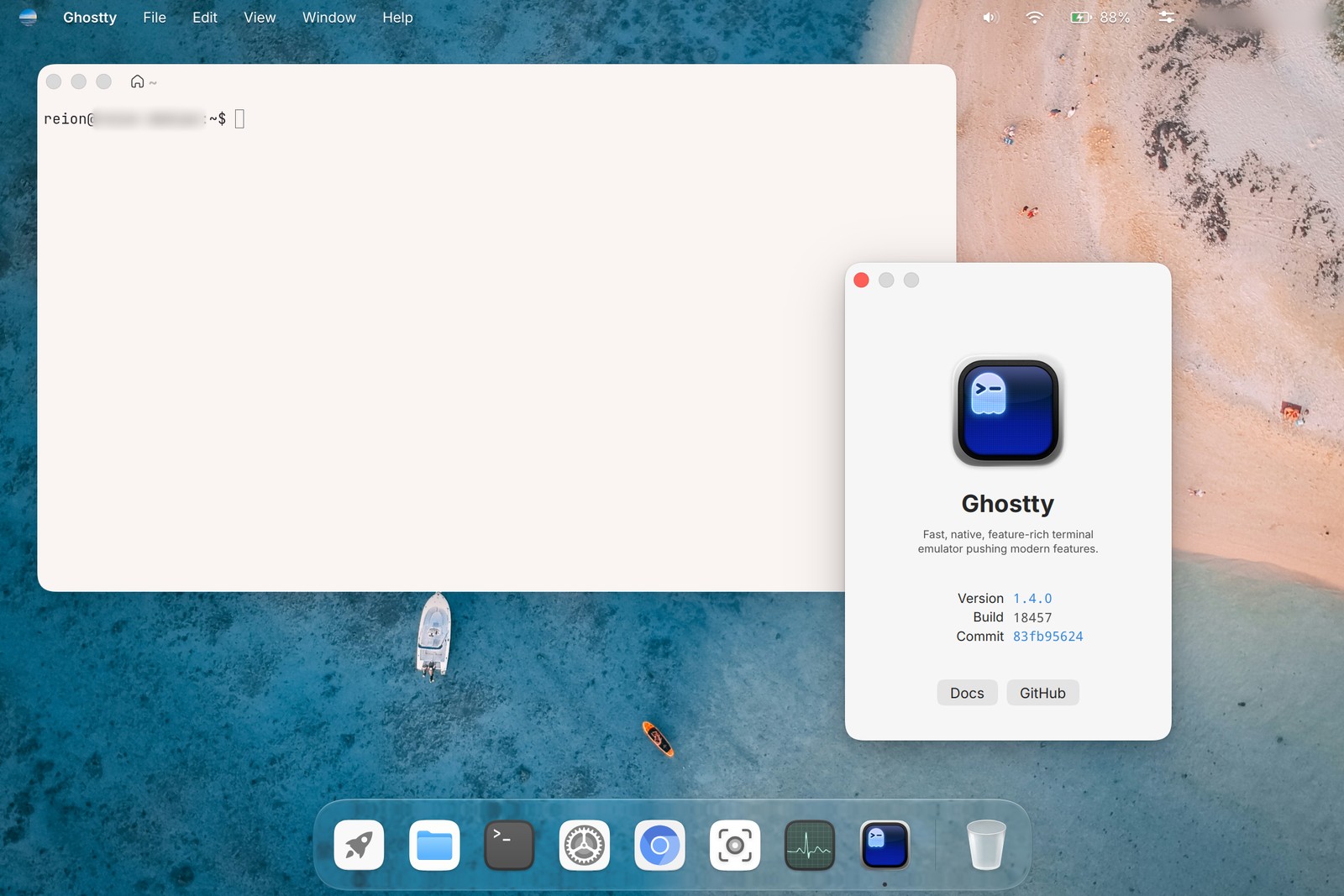
So these are my notes on what has to happen before a window like that can appear, written the way I’d explain it to myself.
The CPU was never the problem
The first thing worth saying is what Reef doesn’t do. It doesn’t translate a single instruction.
An Intel Mac and an Intel or AMD Linux laptop speak exactly the same machine language. An add is an add, whatever operating system is running. So a Mac app’s code can run directly on the processor, at full speed. Only two things are actually different:
- The file format. Linux programs are ELF files, Mac programs are Mach-O files, and Linux has no idea how to read Mach-O.
- The libraries. A Mac program expects
libSystem,Foundation,AppKitand the rest, and Linux has none of them.
Reef’s frameworks take care of the second one. The loader takes care of the first, and then wires the program up to those frameworks.
Why a loader is enough
What makes this possible at all is a decision Apple made a long time ago. On Linux, programs can talk to the kernel directly through system calls, and the kernel keeps those stable. On a Mac, programs aren’t supposed to. They call functions in system libraries, and only libSystem at the very bottom talks to the kernel. Apple changes the system calls whenever it likes, so apps can’t depend on them.
That means I never have to pretend to be the Mac’s kernel. I only need libraries that answer the same function calls, and a loader that puts the app and those libraries into one process. In the end a running Mac app on Reef is two worlds sharing one process:
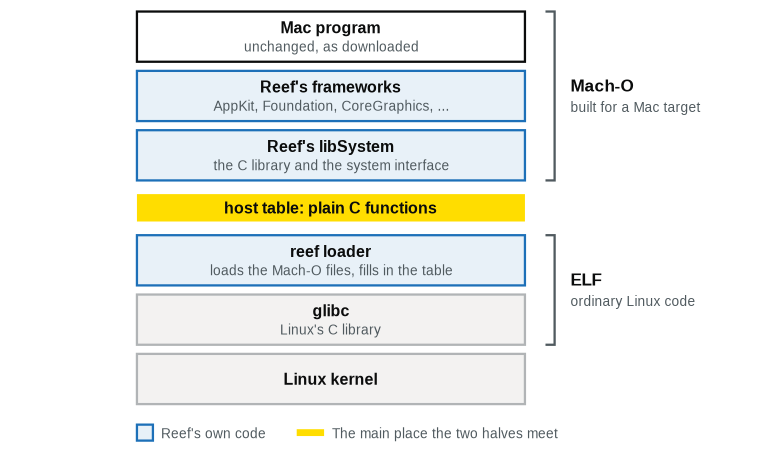
The top half is all Mach-O. Reef builds its own libraries as Mach-O files too, with clang and the LLVM linker aimed at a Mac target, so the app finds what it would find on a Mac: the same file format, the same calling conventions, the same layout for Objective-C classes. The bottom half is just Linux. The reef loader is an ordinary ELF program linked against glibc. The two halves only touch through a few narrow doors, all plain C. The main one is a table of functions the loader fills in, which I’ll get to at the end. Reef’s AppKit has a second one into the Linux desktop’s toolkit, and a few libraries call Linux libraries like ICU and SQLite directly.
On a Mac this job belongs to dyld. The reef loader does the same job, from scratch.
A program file is a flat-pack box
I find it helps to stop thinking of a program file as “the program”. It’s closer to a flat-pack box: the parts, plus an instruction sheet saying where each part goes and which screws you have to fetch from somewhere else.
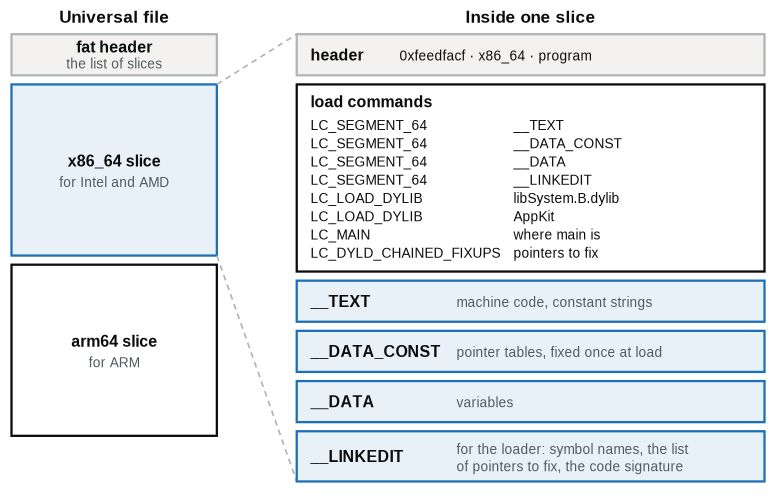
A universal file is really several programs glued together, one per processor. Many Mac apps carry an x86_64 copy and an arm64 copy, and each copy is called a slice. Inside a slice there’s a header (the magic number 0xfeedfacf, the processor, what kind of file it is), then the load commands, which are the instruction sheet, then the segments with the actual contents: machine code in __TEXT, variables and pointer tables in __DATA_CONST and __DATA, and the loader’s own bookkeeping in __LINKEDIT.
The picture cheats a little to stay readable. It leaves out __PAGEZERO, an empty segment in every program that only reserves the lowest addresses, and in a real file the header and load commands sit at the very start of __TEXT, so once __TEXT is in memory the header is too, and a program can read its own load commands while it runs.
There’s one rule in the load commands I really like. Every command type has a bit that means “a loader that doesn’t understand me must refuse this file”. Commands without that bit can be skipped like comments. So the format tells you, in the file itself, which parts are safe to ignore. The reef loader follows it: an unknown command with that bit set stops the launch with a clear message, instead of starting something it only half understands.
Putting the pieces in memory
The loader reads the first few bytes, and if it’s a universal file, picks the slice for the processor it’s on. Then it goes through the segment commands, each of which says “take these bytes from the file and put them at this address”.
The catch is that the address in the file is only where the program would like to be. Lots of libraries share one process and they can’t all sit at the same spot. So the loader finds a free range, puts every segment there at the same distances from each other as in the file, and remembers how far the whole thing moved. That distance is the slide.
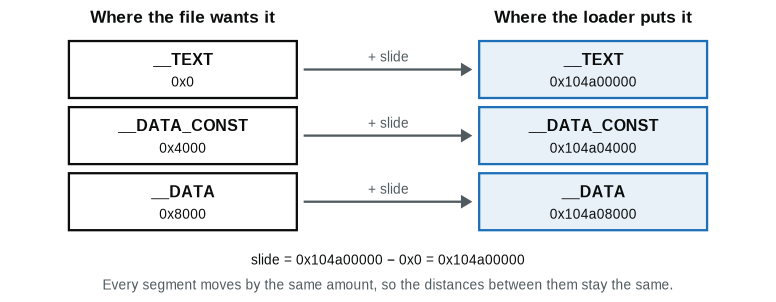
Since everything moves together, code that finds its own data by “it’s this far from me” keeps working untouched. Mac programs are built that way on purpose, and the loader refuses one that isn’t.
A couple of details I like in Reef’s version. Whole pages are mapped straight from the file with mmap instead of being copied, so the pages that never change stay shared: ten processes using the same framework keep one copy of its code in memory. And every image lands somewhere between 4 GB and 64 GB, which looks arbitrary until you know why. Objective-C code built for arm64 stores pointers to classes in 36 bits, and 36 bits stop at 64 GB.
The switch that makes it all work
Each LC_LOAD_DYLIB command names a library by the full path it has on a Mac:
/usr/lib/libSystem.B.dylib
/System/Library/Frameworks/Foundation.framework/Versions/C/Foundation
/System/Library/Frameworks/AppKit.framework/Versions/C/AppKit
@rpath/Sparkle.framework/Versions/B/Sparkle
This is the moment I think of as the whole trick. Before looking at the real path, the loader looks for the same path inside Reef’s own directory. Reef’s AppKit lives at <reef>/System/Library/Frameworks/AppKit.framework/..., so an app that asks for Apple’s AppKit by its exact path gets Reef’s AppKit, and has no way to notice. Not one byte of the app changes.
The @ names are relative. @executable_path is the program’s own folder, @loader_path is the folder of whichever library is asking, and @rpath means “try each folder on my search list”, which is how an app finds the frameworks it ships inside its own bundle. Libraries have their own dependencies, so loading is a list that keeps growing until nothing new turns up.
Filling in the blanks
This is the part with the most going on, and the part I find most satisfying once it makes sense.
A program is full of pointers: slots in memory that hold the address of something else. When the file was written, nobody knew where anything would end up, so those slots hold placeholders, and the file carries a to-do list of every slot that needs a real address.
There are only two kinds of entries. A rebase points inside the same image, and fixing it is just adding the slide. A bind points into another library, like printf in libSystem or the NSWindow class in AppKit. The file holds a name there, and the loader has to look it up.
What I like about the Mac’s way of looking things up is that every import says both what it wants and where from: “_printf from my library number 1”. Apple calls this the two-level namespace. Two libraries can have a function with the same name and nothing gets confused, and the search is quick, because only one library needs searching. Each library keeps its exports in a compact prefix tree, so even with tens of thousands of names, a lookup is a short walk down the tree.
Newer programs write the to-do list in a format I think is genuinely clever, called chained fixups. There’s no separate list at all. The placeholders form a chain: each 8-byte slot that needs fixing holds a small packed record saying what it is (a rebase target, or an index into an import table) and how far away the next slot in the chain is. The file only needs to say where each page’s chain starts.
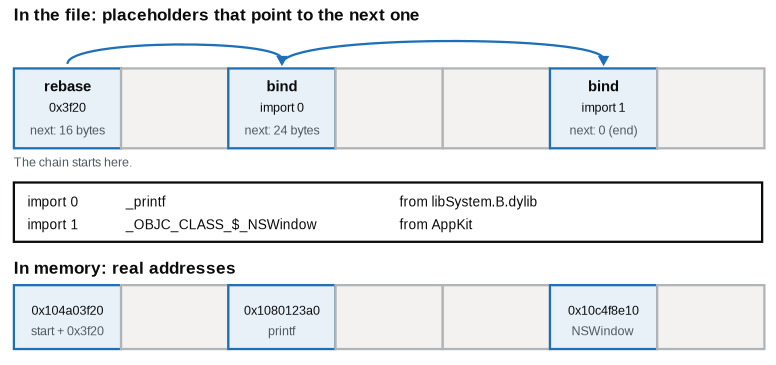
So the loader walks each chain: read the slot, work out the real address, write it over the placeholder, hop to the next one, stop at zero. Older programs use a small bytecode for the same thing (“go to segment 2, offset 0x40, bind _printf here, skip 8, do it five more times”), and Reef reads that too.
A real Mac can leave some of these until the first call. Reef resolves everything before the program starts, so no call the program makes ever has to stop at the loader to find out where it goes. It also remembers the answers. A big app needs a great many lookups, and they come out the same every launch, so the first launch records them and the next one replays them, as long as every file is still exactly the same.
When a name isn’t found anywhere, the launch normally stops with “symbol not found”. That’s right, but not very useful while an app is first being brought up, because the first missing name hides the rest. So there’s a mode where every missing function or variable gets its own little 64-byte slot of memory that can be read but not run. Read as data, it’s a zero or a nil. Called as a function, it crashes on the spot, and the crash handler knows which slot it was and prints the name. The app runs as far as it can and tells you exactly what it needed first.
Per-thread data and the other register
Thread-local variables need their own handling, because Linux and Mach-O do them differently. In a Mach-O file, each one is a small descriptor: a function to call, a key, an offset. The code calls the function to get this thread’s copy. The file doesn’t contain that function, so the loader points every descriptor at an access function in Reef’s libSystem, and that function finds this thread’s block for the image and adds the offset.
The detail I enjoy here is about registers. On x86_64, Linux and glibc keep their thread data behind %fs. The Mac keeps its thread-specific data behind %gs, and some programs read it directly: the Go runtime keeps the current goroutine in one of those slots, and Chrome reads its own keys there. Linux leaves %gs free, so the loader points %gs at a per-thread array laid out the way the Mac lays it out. Each system’s thread data ends up in its own register, side by side, without getting in each other’s way.
Then it just calls main
After that it’s mostly bookkeeping. Initializers run in dependency order, so a library is set up before anything that uses it, with Objective-C’s +load methods along the way. Then the loader lays out the arguments, the environment and the Mac’s extra “apple” strings one after another the way the kernel would (the Go runtime finds the environment by walking past the end of the arguments), looks up main through LC_MAIN, and calls it:
int status = main(argc, argv, envp, apple);
exit(status);
From that point the Mac program is just running, on the real CPU, with no loader in the way.
One call, all the way down
The loader’s table from the first picture is the main place the two worlds meet, and following one call through it makes the whole design clear to me.
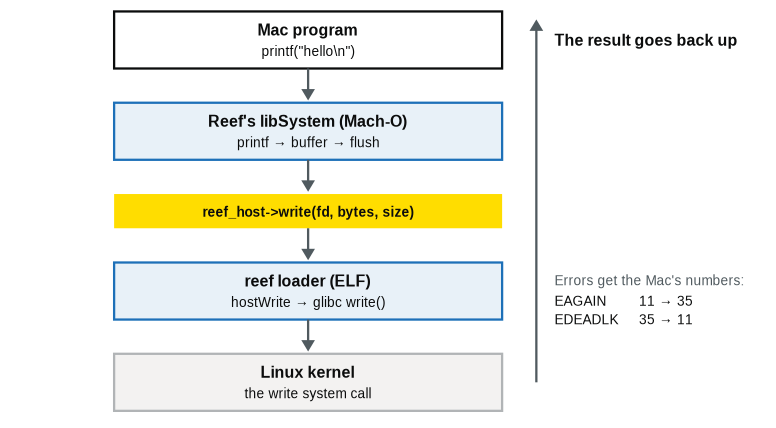
When a Mac program calls printf("hello\n"), the slot it calls through already holds the address of printf in Reef’s libSystem. That formats the text into a buffer, and when the buffer is flushed it calls reef_host->write, a function pointer in the table. The pointer leads into the loader, which is ELF code, and the loader calls glibc’s write, which makes the Linux system call.
The loader fills that table in at startup and writes its address into a variable libSystem exports, before any Mach-O code runs. Only plain C functions with a fixed number of arguments go through it. Mac and Linux code mostly agree on how such functions pass their arguments, and keeping the table that plain means nothing in between has to translate.
It’s also where the two systems’ habits get translated. “Try again” (EAGAIN) is 11 on Linux and 35 on a Mac, and “deadlock” is the other way round. SIGUSR1 is 10 on Linux and 30 on a Mac. A Mac’s struct stat has a different layout and fields Linux doesn’t have. All of that is converted on the way across, so the Mac program only ever sees the Mac’s numbers and layouts, and everything below is plain Linux.
Looking at it as a whole, none of this changes an instruction of the program. The loader puts the pieces where they belong and fills in the addresses the file left open, and after that every library call the program makes lands in Reef’s libraries.
After the principle, it’s labor
Once all of this makes sense, the interesting part is pretty much over. The core of the loader, reading the file, mapping it and fixing the pointers, is a little over three thousand lines, and it hardly moves anymore: of Reef’s 1,721 commits so far, 28 touched it. There are only so many ways to fill in a pointer.
Everything above it is a different story. The loader only promises that when an app asks for NSWindow, it gets whatever Reef’s AppKit has under that name. Whether that thing behaves like the real one is a separate question, and it has to be answered again for every class, every method and every constant, across more than 80 frameworks. Reef is past half a million lines of them, and nowhere near the end.
There’s no clever trick waiting at that level. Every new app brings its own list of what’s missing, and making a symbol exist is the easy half; it also has to behave like the Mac, down to the spacing, the colours and the order in which notifications arrive.
It’s a bottomless pit, too. Apple ships new APIs every year, apps start using them, and the list grows again.
So this is how I see it now. The principle is the small part, and it’s worth understanding properly, because it tells you what’s possible at all. After that, it’s manual labor: run an app, find the next gap, fill it, test it, run it again.
I don’t know what Reef’s future looks like. But it already does what I wanted from it in the first place: the Mac apps I love, like Ghostty and NetNewsWire, run perfectly on my Linux desktop.